A Blue Fire Key is a digital code redeemed on the platform specified in the offer, such as Steam. Once the code is accepted, the corresponding product is added to your account. Before buying, check the activation platform, edition, region and product type. Keys, accounts and digital gifts have different access and redemption terms.
Where is Blue Fire the cheapest for PC?
Our price comparison currently lists 17 offers from 17 shops for Blue Fire Key. The lowest displayed price is 0.99 € at Eneba. The difference from the highest-priced offer in this selection is 94 %. Compare prices together with the platform, product type and activation terms. Also check whether a discount code is available for Eneba; any additional discount depends on its terms. Confirm the final price, possible fees and availability on the shop website. For help with activation or use, visit our frequently asked questions and help guides. Buy Blue Fire Key and compare prices across the available offers before choosing.
SteamStandardIn Steam, choose “Add a Game”, then “Activate a Product on Steam” and enter your key. Before buying, check the offer’s activation region and terms.
Last price update: 25.11.2026 05:02. Prices from Blue Fire: €0.99 to €16.79. Prices are updated regularly. Check the total price, VAT, platform and product type on the shop website. Additional fees or taxes may apply. You can report incorrect prices or links to us. Information may change or contain errors; accuracy, completeness and freshness are not guaranteed. Some links are affiliate links: Planetkey may receive a commission when you purchase. As an Amazon Associate, we earn from qualifying purchases. Offers initially appear from lowest to highest price; you can change the order.
Price history for Blue Fire
Track the price history of Blue Fire and compare recorded prices. The comparison currently includes 17 offers from 17 shops. Set a price alert to receive a notification when your target price is reached.
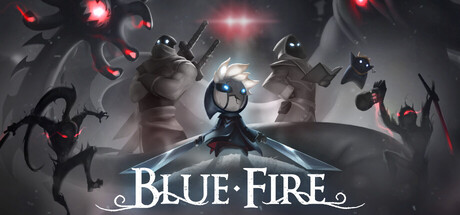
Blue Fire invites players into a captivating, hand-drawn world filled with mysteries and a dark atmosphere. This adventure blends classic Metroidvania elements with challenging jump-and-run sections, unfolding a compelling story where you step into the role of a mysterious hero awakened in an ancient dungeon. The successful mix of exploration, puzzles, and combat makes Blue Fire a unique experience for fans of demanding action and platform games.
When you buy a Blue Fire Key, you gain access to an atmospheric game world with diverse environments and dynamic gameplay that encourages continuous development. The controls are precise and intuitive, while the level design offers varied challenges overcome through a versatile upgrade system that unlocks new abilities. A particular highlight is the striking combination of a dark setting with a charming graphical style.
Atmospheric, hand-drawn game world featuring diverse environments and mysterious levels
Precise and fluid gameplay with challenging jumping and combat mechanics
Versatile upgrade system unlocks new abilities, enriching the gameplay experience
Engaging story and enigmatic characters enhance motivation to keep playing
In summary, buying a Blue Fire Key is the perfect way to dive into an exciting Metroidvania adventure that stands out through its unique design and thrilling mechanics. For players seeking a challenging yet atmospheric game, Blue Fire is a clear recommendation.
COMMENTS
No comments yet.
Be the first to comment on Blue Fire!
WRITE A COMMENT
Log in to post a comment.