A Destiny 2 - Shadowkeep Key is a digital code redeemed on the platform specified in the offer, such as Steam, Steam Gift. Once the code is accepted, the corresponding product is added to your account. Before buying, check the activation platform, edition, region and product type. Keys, accounts and digital gifts have different access and redemption terms.
Where is Destiny 2 - Shadowkeep the cheapest for PC?
Our price comparison currently lists 20 offers from 16 shops for Destiny 2 - Shadowkeep Key. The lowest displayed price is 0.36 € at Kinguin. The difference from the highest-priced offer in this selection is 98 %. Compare prices together with the platform, product type and activation terms. Also check whether a discount code is available for Kinguin; any additional discount depends on its terms. Confirm the final price, possible fees and availability on the shop website. For help with activation or use, visit our frequently asked questions and help guides. Buy Destiny 2 - Shadowkeep Key and compare prices across the available offers before choosing.
SteamStandardIn Steam, choose “Add a Game”, then “Activate a Product on Steam” and enter your key. Before buying, check the offer’s activation region and terms.
SteamStandardIn Steam, choose “Add a Game”, then “Activate a Product on Steam” and enter your key. Before buying, check the offer’s activation region and terms.
SteamStandardIn Steam, choose “Add a Game”, then “Activate a Product on Steam” and enter your key. Before buying, check the offer’s activation region and terms.
SteamDLCIn Steam, choose “Add a Game”, then “Activate a Product on Steam” and enter your key. Before buying, check the offer’s activation region and terms.
SteamStandardIn Steam, choose “Add a Game”, then “Activate a Product on Steam” and enter your key. Before buying, check the offer’s activation region and terms.
SteamStandardIn Steam, choose “Add a Game”, then “Activate a Product on Steam” and enter your key. Before buying, check the offer’s activation region and terms.
SteamStandardIn Steam, choose “Add a Game”, then “Activate a Product on Steam” and enter your key. Before buying, check the offer’s activation region and terms.
SteamStandardIn Steam, choose “Add a Game”, then “Activate a Product on Steam” and enter your key. Before buying, check the offer’s activation region and terms.
SteamStandardIn Steam, choose “Add a Game”, then “Activate a Product on Steam” and enter your key. Before buying, check the offer’s activation region and terms.
SteamStandardIn Steam, choose “Add a Game”, then “Activate a Product on Steam” and enter your key. Before buying, check the offer’s activation region and terms.
SteamStandardIn Steam, choose “Add a Game”, then “Activate a Product on Steam” and enter your key. Before buying, check the offer’s activation region and terms.
SteamStandardIn Steam, choose “Add a Game”, then “Activate a Product on Steam” and enter your key. Before buying, check the offer’s activation region and terms.
SteamStandardIn Steam, choose “Add a Game”, then “Activate a Product on Steam” and enter your key. Before buying, check the offer’s activation region and terms.
SteamStandardIn Steam, choose “Add a Game”, then “Activate a Product on Steam” and enter your key. Before buying, check the offer’s activation region and terms.
SteamStandardIn Steam, choose “Add a Game”, then “Activate a Product on Steam” and enter your key. Before buying, check the offer’s activation region and terms.
SteamStandardIn Steam, choose “Add a Game”, then “Activate a Product on Steam” and enter your key. Before buying, check the offer’s activation region and terms.
SteamStandardIn Steam, choose “Add a Game”, then “Activate a Product on Steam” and enter your key. Before buying, check the offer’s activation region and terms.
SteamStandardIn Steam, choose “Add a Game”, then “Activate a Product on Steam” and enter your key. Before buying, check the offer’s activation region and terms.
SteamStandardIn Steam, choose “Add a Game”, then “Activate a Product on Steam” and enter your key. Before buying, check the offer’s activation region and terms.
SteamStandardIn Steam, choose “Add a Game”, then “Activate a Product on Steam” and enter your key. Before buying, check the offer’s activation region and terms.
SteamStandardIn Steam, choose “Add a Game”, then “Activate a Product on Steam” and enter your key. Before buying, check the offer’s activation region and terms.
SteamStandardIn Steam, choose “Add a Game”, then “Activate a Product on Steam” and enter your key. Before buying, check the offer’s activation region and terms.
SteamStandardIn Steam, choose “Add a Game”, then “Activate a Product on Steam” and enter your key. Before buying, check the offer’s activation region and terms.
SteamStandardIn Steam, choose “Add a Game”, then “Activate a Product on Steam” and enter your key. Before buying, check the offer’s activation region and terms.
SteamStandardIn Steam, choose “Add a Game”, then “Activate a Product on Steam” and enter your key. Before buying, check the offer’s activation region and terms.
SteamStandardIn Steam, choose “Add a Game”, then “Activate a Product on Steam” and enter your key. Before buying, check the offer’s activation region and terms.
SteamStandardIn Steam, choose “Add a Game”, then “Activate a Product on Steam” and enter your key. Before buying, check the offer’s activation region and terms.
SteamStandardIn Steam, choose “Add a Game”, then “Activate a Product on Steam” and enter your key. Before buying, check the offer’s activation region and terms.
SteamStandardIn Steam, choose “Add a Game”, then “Activate a Product on Steam” and enter your key. Before buying, check the offer’s activation region and terms.
SteamDeluxeIn Steam, choose “Add a Game”, then “Activate a Product on Steam” and enter your key. Before buying, check the offer’s activation region and terms.
SteamDeluxeIn Steam, choose “Add a Game”, then “Activate a Product on Steam” and enter your key. Before buying, check the offer’s activation region and terms.
SteamDeluxeIn Steam, choose “Add a Game”, then “Activate a Product on Steam” and enter your key. Before buying, check the offer’s activation region and terms.
SteamDeluxeIn Steam, choose “Add a Game”, then “Activate a Product on Steam” and enter your key. Before buying, check the offer’s activation region and terms.
Last price update: 21.11.2026 17:02. Prices from Destiny 2 - Shadowkeep: €0.36 to €19.99. Prices are updated regularly. Check the total price, VAT, platform and product type on the shop website. Additional fees or taxes may apply. You can report incorrect prices or links to us. Information may change or contain errors; accuracy, completeness and freshness are not guaranteed. Some links are affiliate links: Planetkey may receive a commission when you purchase. As an Amazon Associate, we earn from qualifying purchases. Offers initially appear from lowest to highest price; you can change the order.
Price history for Destiny 2 - Shadowkeep
Track the price history of Destiny 2 - Shadowkeep and compare recorded prices. The comparison currently includes 20 offers from 16 shops. Set a price alert to receive a notification when your target price is reached.
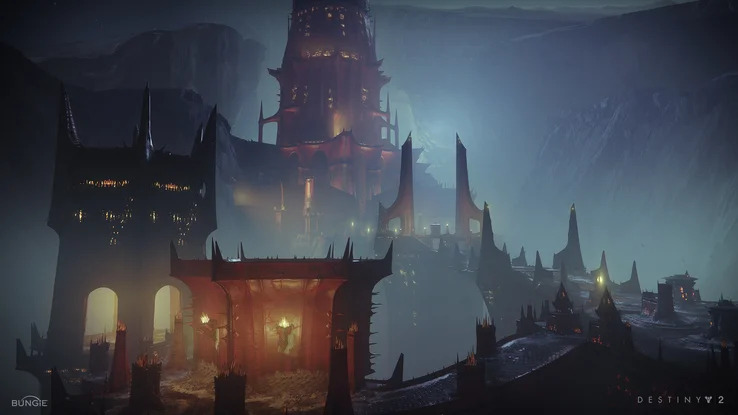
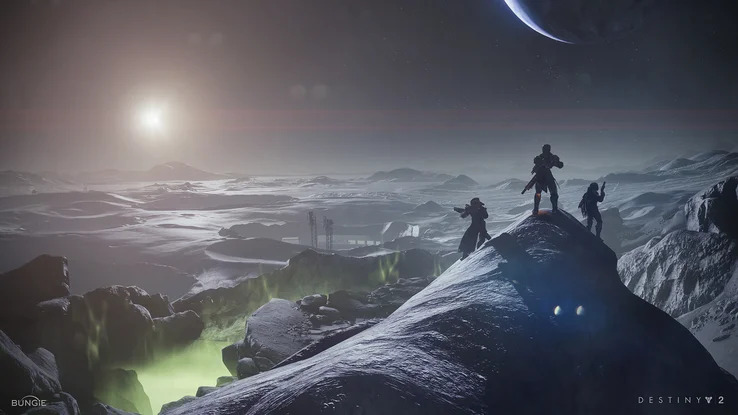
Destiny 2: Shadowkeep is a major expansion to the acclaimed online MMO shooter Destiny 2, developed by Bungie. This chapter introduces a darker and more immersive story set on the Moon, where horrifying nightmares have emerged from the shadows, threatening its inhabitants. Players join Eris Morn, a key returning character, to confront the shadowy forces and uncover the mysteries behind these ominous events.
Shadowkeep primarily focuses on delivering a fresh narrative experience along with numerous new missions and quests. The Moon serves as the central setting, featuring both familiar and yet unexplored locations that offer fresh challenges and discoveries. Players can freely explore these new areas, engage in combat, and collect new weapons and armor pieces that add to the dynamic loot-driven gameplay. The expansion also enriches the game world with intriguing new gear found notably within the Fortress of Shadows, a critical hub for the story.
Includes a new darker story expansion featuring Eris Morn and nightmare-themed threats on the Moon
Offers numerous new missions, quests, and areas to explore within an expanded lunar environment
Introduces new weapons, armor, and loot to enhance progression and customize playstyles
Features a challenging new raid called Black Garden that demands teamwork and skill
Additionally, the Black Garden raid brings intense cooperative gameplay for experienced groups, requiring strategic teamwork to overcome complex puzzles and enemies for rewarding loot. Destiny 2: Shadowkeep also launches alongside Destiny 2: New Light, the free version of the base game with some prior expansions included, making it accessible to new players. Buy your Destiny 2 Shadowkeep Key today and compare prices to find the best offer for this thrilling expansion.

 Instant Gaming
 Kinguin
Marketplace
 K4G
 Gameseal
 Eneba
 Gamivo
 G2A
 Gamebillet
 GreenManGaming
 Gamesplanet
 Loaded (CDKeys)
 HRK
 cjs-cdkeys
 keycense
 Gamingdragons
 Voidu
 Fanatical
 GamersOutlet
 Wyrel
 Gamersgate
 Indiegala


COMMENTS
No comments yet.
Be the first to comment on Destiny 2 - Shadowkeep!
WRITE A COMMENT
Log in to post a comment.