
How to Activate a Steam Gift
Have you received a Steam Gift or purchased an offer as a Steam Gift or altered gift? Here you'll learn how to accept the gift and add the game to your Steam account.
GIFT
Accepting a Steam Gift
A Steam Gift is a gifted game. You accept it through Steam and it will be added to your library.
To gift instructionsPRODUCT KEY
Got a code?
A game key or wallet credit code is redeemed on a different page. A Steam Gift is not a product key.
To key and wallet instructionsHow to accept a Steam Gift
- Choose the right account: Launch the Steam desktop app and log into the account where you want to use the game.
- Open the gift: Click the notifications icon in the top right corner of the Steam app and open the entry for your new gift. Steam will show you the gift page. Alternatively, you can use the official redemption link from the gift email.
- Accept the gift: Check the game title and select "Accept Gift." The game will be added to your library.Install: Select the game in your library and download it. For pre-orders, playing is only possible after the release date.Accept within 30 days: You have 30 days to accept the gift after delivery. If you decline or the time runs out, Steam refunds the purchase to the original buyer.
- Log in to Steam Steam Gift or Altered Gift from a shop
"Altered gift" is a term used by some retailers. What matters are the specific delivery terms: some sellers require your Steam profile link or friend code and then send the game via a Steam account. Check the offer:
Before buying, check the game, edition, platform, region, and delivery method described. For DLCs, you might need the base game.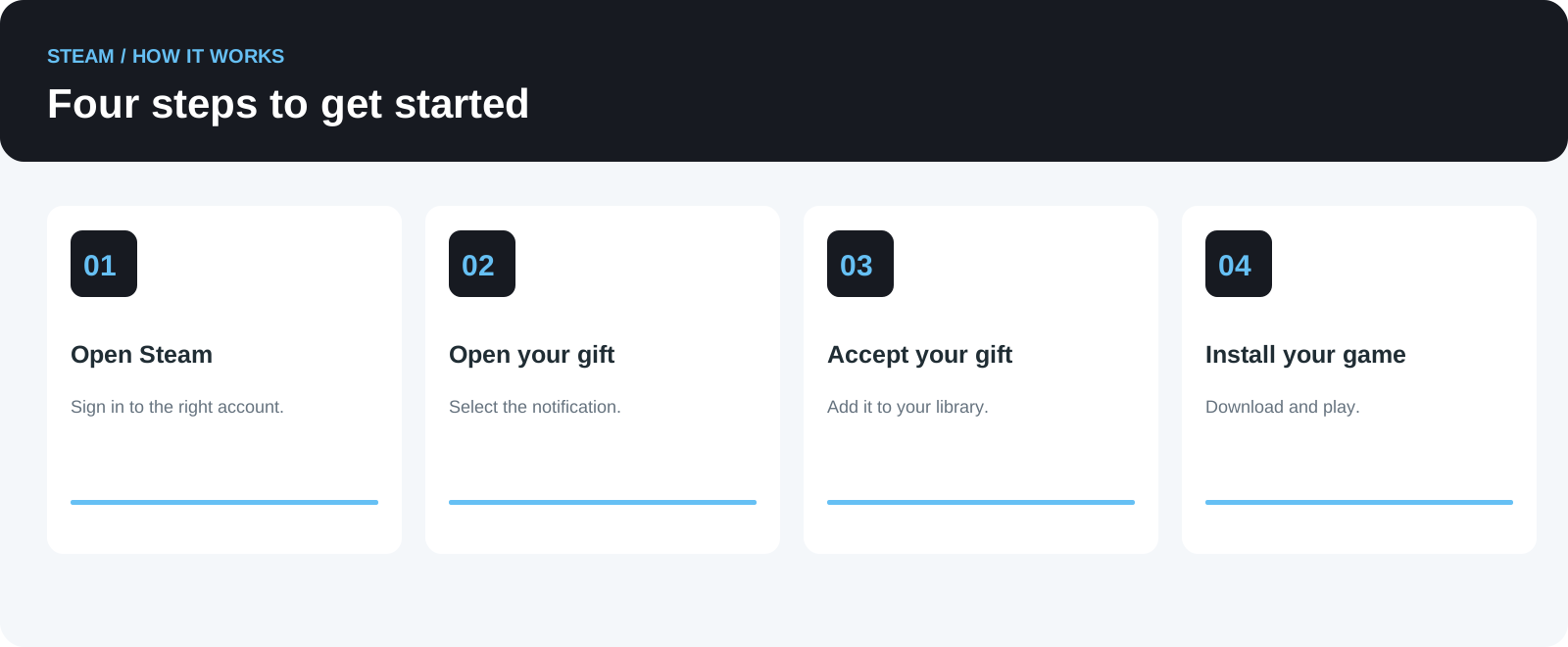
Prepare for delivery:
Follow the seller’s ordering instructions. If a friend request is part of the process, verify the sender based on your order. Never share passwords, Steam Guard codes, or recovery codes.
- Receive the gift: Once delivered, accept it using the steps described above. If delivery fails, contact the seller.
- Check the region: A Steam Gift isn't automatically from another country. Delivery may be subject to country or product restrictions. Only trust a "worldwide activation" claim if it is explicitly confirmed for the specific offer.
- Frequently Asked Questions Do I need to be friends with the sender on Steam?
It depends on the delivery method. Since July 2026, Steam supports gifts to email addresses and shared wishlists. For some delivery options and store purchases, a Steam friendship is still required. Email gifts require buyer and recipient to be in the same country, according to Steam. Can I keep the gift in my inventory or resend it?
Currently, accepting a gift associates it with your library. The option to choose "library or inventory" is no longer generally valid. A game once activated cannot be transferred to another account.
The gift is missing or cannot be accepted – what should I do?
Check your account, your email inbox including spam folder, and the agreed delivery time. Also verify if you already own the game or if there is a region restriction. For store orders, contact the seller with your order number and error message. For technical Steam issues, contact Steam Support.
Is a Steam Gift a digital gift card?
A Steam Gift adds a specific game to your library. A digital Steam gift card increases your wallet credit instead. This guide explains how to receive a gifted game.
Sources: Steam: Gifts and Steam: Gifting made easier, July 2026. Checked on 02.10.2026.
Four steps: Open Steam, open the gift, accept it, install the game.Relax, accepting your Steam Gift is easy and secure. Keep an eye on your notifications to find your gift instantly.
Make sure you’re logged into the correct Steam account before accepting.
Once you accept, the game is yours to download and enjoy.
Remember to accept your gift within 30 days to avoid automatic refunds.If you bought from a shop, always verify their delivery instructions carefully. Never share critical login info, and always confirm friend requests carefully.If you encounter problems, contact the retailer or Steam Support with your order details. Be aware of potential region or product restrictions affecting gift activation.