A Tekken 7 Key is a digital code redeemed on the platform specified in the offer, such as Steam. Once the code is accepted, the corresponding product is added to your account. Before buying, check the activation platform, edition, region and product type. Keys, accounts and digital gifts have different access and redemption terms.
Where is Tekken 7 the cheapest for PC?
Our price comparison currently lists 40 offers from 22 shops for Tekken 7 Key. The lowest displayed price is 3.87 € at Driffle. The difference from the highest-priced offer in this selection is 93 %. Compare prices together with the platform, product type and activation terms. Also check whether a discount code is available for Driffle; any additional discount depends on its terms. Confirm the final price, possible fees and availability on the shop website. For help with activation or use, visit our frequently asked questions and help guides. Buy Tekken 7 Key and compare prices across the available offers before choosing.
SteamStandardIn Steam, choose “Add a Game”, then “Activate a Product on Steam” and enter your key. Before buying, check the offer’s activation region and terms.
SteamUltimateIn Steam, choose “Add a Game”, then “Activate a Product on Steam” and enter your key. Before buying, check the offer’s activation region and terms.
SteamOriginalsIn Steam, choose “Add a Game”, then “Activate a Product on Steam” and enter your key. Before buying, check the offer’s activation region and terms.
SteamDeluxeIn Steam, choose “Add a Game”, then “Activate a Product on Steam” and enter your key. Before buying, check the offer’s activation region and terms.
SteamUltimateIn Steam, choose “Add a Game”, then “Activate a Product on Steam” and enter your key. Before buying, check the offer’s activation region and terms.
SteamDeluxeIn Steam, choose “Add a Game”, then “Activate a Product on Steam” and enter your key. Before buying, check the offer’s activation region and terms.
SteamRematchIn Steam, choose “Add a Game”, then “Activate a Product on Steam” and enter your key. Before buying, check the offer’s activation region and terms.
SteamDeluxeIn Steam, choose “Add a Game”, then “Activate a Product on Steam” and enter your key. Before buying, check the offer’s activation region and terms.
SteamUltimateIn Steam, choose “Add a Game”, then “Activate a Product on Steam” and enter your key. Before buying, check the offer’s activation region and terms.
SteamDeluxeIn Steam, choose “Add a Game”, then “Activate a Product on Steam” and enter your key. Before buying, check the offer’s activation region and terms.
SteamStandardIn Steam, choose “Add a Game”, then “Activate a Product on Steam” and enter your key. Before buying, check the offer’s activation region and terms.
SteamRematchIn Steam, choose “Add a Game”, then “Activate a Product on Steam” and enter your key. Before buying, check the offer’s activation region and terms.
SteamStandardIn Steam, choose “Add a Game”, then “Activate a Product on Steam” and enter your key. Before buying, check the offer’s activation region and terms.
SteamDeluxeIn Steam, choose “Add a Game”, then “Activate a Product on Steam” and enter your key. Before buying, check the offer’s activation region and terms.
SteamUltimateIn Steam, choose “Add a Game”, then “Activate a Product on Steam” and enter your key. Before buying, check the offer’s activation region and terms.
SteamDeluxeIn Steam, choose “Add a Game”, then “Activate a Product on Steam” and enter your key. Before buying, check the offer’s activation region and terms.
SteamRematchIn Steam, choose “Add a Game”, then “Activate a Product on Steam” and enter your key. Before buying, check the offer’s activation region and terms.
SteamStandardIn Steam, choose “Add a Game”, then “Activate a Product on Steam” and enter your key. Before buying, check the offer’s activation region and terms.
SteamDeluxeIn Steam, choose “Add a Game”, then “Activate a Product on Steam” and enter your key. Before buying, check the offer’s activation region and terms.
SteamRematchIn Steam, choose “Add a Game”, then “Activate a Product on Steam” and enter your key. Before buying, check the offer’s activation region and terms.
SteamUltimateIn Steam, choose “Add a Game”, then “Activate a Product on Steam” and enter your key. Before buying, check the offer’s activation region and terms.
SteamRematchIn Steam, choose “Add a Game”, then “Activate a Product on Steam” and enter your key. Before buying, check the offer’s activation region and terms.
SteamDeluxeIn Steam, choose “Add a Game”, then “Activate a Product on Steam” and enter your key. Before buying, check the offer’s activation region and terms.
SteamUltimateIn Steam, choose “Add a Game”, then “Activate a Product on Steam” and enter your key. Before buying, check the offer’s activation region and terms.
Last price update: 09.11.2026 05:02. Prices from Tekken 7: €3.87 to €62.49. Prices are updated regularly. Check the total price, VAT, platform and product type on the shop website. Additional fees or taxes may apply. You can report incorrect prices or links to us. Information may change or contain errors; accuracy, completeness and freshness are not guaranteed. Some links are affiliate links: Planetkey may receive a commission when you purchase. As an Amazon Associate, we earn from qualifying purchases. Offers initially appear from lowest to highest price; you can change the order.
Price history for Tekken 7
Track the price history of Tekken 7 and compare recorded prices. The comparison currently includes 40 offers from 22 shops. Set a price alert to receive a notification when your target price is reached.
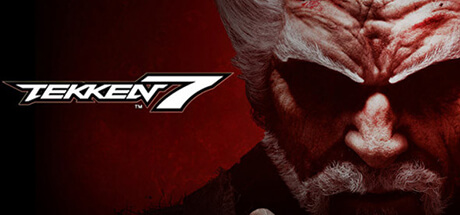
Tekken 7 marks the epic conclusion to the long-running Mishima family feud in the legendary King of Iron Fist Tournament. Featuring a compelling story-driven mode, players experience intense battles powered by stunning Unreal Engine 4 graphics. The game presents a roster of 30 fighters, blending classic characters with exciting new entrants. Each fighter brings unique martial arts styles such as Kung-Fu, Ninjutsu, and Taek Won Do, allowing you to craft your preferred combat approach with your Tekken 7 Key.
Making a notable guest appearance is Akuma from the Street Fighter series, who debuts in the Tekken franchise here. Dive into the decades-long saga of the Mishima clan with cinematic 1-on-1 fights where family rivalries and corporate power struggles come to a head. The game’s refined combat system introduces new mechanics like Rage Arts, Power Crushes, and Rage Drives, making Tekken 7 accessible to newcomers while offering depth for veterans. Whether competing against friends or in multiplayer battles, Tekken 7 delivers thrilling action.
Boasting near-photorealistic visuals and spectacular fight effects thanks to Unreal Engine 4, Tekken 7 is the most visually impressive title in the series to date. Secure your Tekken 7 Steam Key and be ready to experience the climax of this iconic fighting game saga. If you're interested in the sequel, you can also find a price comparison for Tekken 8 keys.
- Epic conclusion to Mishima family feud with cinematic story mode
- 30 fighters combining classic and new martial arts characters
- New combat mechanics: Rage Arts, Power Crushes, Rage Drives
- Guest fighter Akuma from Street Fighter debuts in Tekken series
Buy your Tekken 7 Steam Key today and compare prices to get the best deal for this ultimate fighting experience.
Requires a 64-bit processor and operating system OS *: Windows 7/8/10 (64-bit OS required) Processor: Intel Core i3-4160 @ 3.60GHz or equivalent Memory: 6 GB RAM Graphics: NVIDIA GeForce GTX 660 2GB, GTX 750Ti 2GB, or equivalent DirectX: Version 11 Network: Broadband Internet connection Storage: 60 GB available space Sound Card: DirectX compatible soundcard or onboard chipset
Requires a 64-bit processor and operating system OS *: Windows 7/8/10 (64-bit OS required) Processor: Intel Core i5-4690 3.5 GHz or equivalent Memory: 8 GB RAM Graphics: NVIDIA GeForce GTX 1060 equivalent or higher DirectX: Version 11 Network: Broadband Internet connection Storage: 60 GB available space Sound Card: DirectX compatible soundcard or onboard chipset
COMMENTS
No comments yet. Be the first to comment on Tekken 7!
COMMENTS
No comments yet.
Be the first to comment on Tekken 7!
WRITE A COMMENT
Log in to post a comment.