A Worms Rumble Key is a digital code redeemed on the platform specified in the offer, such as Steam. Once the code is accepted, the corresponding product is added to your account. Before buying, check the activation platform, edition, region and product type. Keys, accounts and digital gifts have different access and redemption terms.
Where is Worms Rumble the cheapest for PC?
Our price comparison currently lists 30 offers from 22 shops for Worms Rumble Key. The lowest displayed price is 0.14 € at HRK. The difference from the highest-priced offer in this selection is 99 %. Compare prices together with the platform, product type and activation terms. Also check whether a discount code is available for HRK; any additional discount depends on its terms. Confirm the final price, possible fees and availability on the shop website. For help with activation or use, visit our frequently asked questions and help guides. Buy Worms Rumble Key and compare prices across the available offers before choosing.
SteamStandardIn Steam, choose “Add a Game”, then “Activate a Product on Steam” and enter your key. Before buying, check the offer’s activation region and terms.
SteamDeluxeIn Steam, choose “Add a Game”, then “Activate a Product on Steam” and enter your key. Before buying, check the offer’s activation region and terms.
Last price update: 25.11.2026 20:00. Prices from Worms Rumble: €0.14 to €21.99. Prices are updated regularly. Check the total price, VAT, platform and product type on the shop website. Additional fees or taxes may apply. You can report incorrect prices or links to us. Information may change or contain errors; accuracy, completeness and freshness are not guaranteed. Some links are affiliate links: Planetkey may receive a commission when you purchase. As an Amazon Associate, we earn from qualifying purchases. Offers initially appear from lowest to highest price; you can change the order.
Price history for Worms Rumble
Track the price history of Worms Rumble and compare recorded prices. The comparison currently includes 30 offers from 22 shops. Set a price alert to receive a notification when your target price is reached.
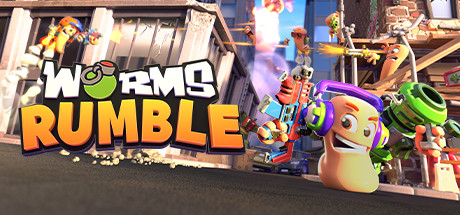
Worms Rumble is a dynamic multiplayer action game that reimagines the classic Worms universe with fast-paced, real-time combat. Moving away from the traditional turn-based gameplay, Worms Rumble features intense 2.5D battles in varied arenas where up to 32 players fight simultaneously. The vibrant world combines charming comic-style graphics with modern animations, creating an engaging and lively experience.
When you buy a Worms Rumble Key, you gain access to multiple modes such as Battle Royale and Team Deathmatch, offering plenty of excitement and tactical depth. A wide selection of weapons and power-ups ensures diverse gameplay styles, while the intuitive controls help newcomers jump into the action quickly. Seasonal updates and events keep the game fresh and compelling over time.
Exciting real-time combat for up to 32 players across different arenas delivers fast multiplayer action.
Diverse weapons and power-ups allow for varied playstyles and strategic depth.
Charming graphics blend classic Worms design with modern animations and effects.
Regular updates and seasonal events provide ongoing content and challenges.
Purchasing a Worms Rumble Key lets you dive into the action-packed world of the tiny worms and enjoy thrilling battles. It’s highly recommended for fans of the series and action multiplayer games, delivering engaging gameplay and an entertaining atmosphere. Buy a Worms Rumble Key now and compare prices to find the best offer available.
Requires a 64-bit processor and operating system Operating System: Windows 10 64-bit Processor: Intel Core i5-2300 or FX-4350 Memory: 4 GB RAM Graphics: 2GB NVIDIA GeForce or 2GB AMD Radeon
Requires a 64-bit processor and operating system Operating System: Windows 10 64-bit Processor: Intel Core i5-6600 or AMD Ryzen 5 1600 Memory: 8 GB RAM Graphics: 4GB NVIDIA GeForce or 4GB AMD Radeon
COMMENTS
No comments yet. Be the first to comment on Worms Rumble!
COMMENTS
No comments yet.
Be the first to comment on Worms Rumble!
WRITE A COMMENT
Log in to post a comment.