A The Elder Scrolls Online - Necrom Key is a digital code redeemed on the platform specified in the offer, such as Steam, Steam Gift, PC Download. Once the code is accepted, the corresponding product is added to your account. Before buying, check the activation platform, edition, region and product type. Keys, accounts and digital gifts have different access and redemption terms.
Where is The Elder Scrolls Online - Necrom the cheapest for PC?
Our price comparison currently lists 11 offers from 3 shops for The Elder Scrolls Online - Necrom Key. The lowest displayed price is 9.49 € at Instant Gaming. The difference from the highest-priced offer in this selection is 89 %. Compare prices together with the platform, product type and activation terms. Also check whether a discount code is available for Instant Gaming; any additional discount depends on its terms. Confirm the final price, possible fees and availability on the shop website. For help with activation or use, visit our frequently asked questions and help guides. Buy The Elder Scrolls Online - Necrom Key and compare prices across the available offers before choosing.
SteamUpgradeIn Steam, choose “Add a Game”, then “Activate a Product on Steam” and enter your key. Before buying, check the offer’s activation region and terms.
SteamDeluxe CollectionIn Steam, choose “Add a Game”, then “Activate a Product on Steam” and enter your key. Before buying, check the offer’s activation region and terms.
SteamStandardIn Steam, choose “Add a Game”, then “Activate a Product on Steam” and enter your key. Before buying, check the offer’s activation region and terms.
SteamDeluxe UpgradeIn Steam, choose “Add a Game”, then “Activate a Product on Steam” and enter your key. Before buying, check the offer’s activation region and terms.
SteamCollectionIn Steam, choose “Add a Game”, then “Activate a Product on Steam” and enter your key. Before buying, check the offer’s activation region and terms.
SteamUpgradeIn Steam, choose “Add a Game”, then “Activate a Product on Steam” and enter your key. Before buying, check the offer’s activation region and terms.
Steam GiftUpgradeA Steam gift is a game received as a gift, for example through a link. Follow the seller’s instructions to accept it in Steam. Before buying, check regional restrictions and delivery terms.
SteamDeluxe UpgradeIn Steam, choose “Add a Game”, then “Activate a Product on Steam” and enter your key. Before buying, check the offer’s activation region and terms.
Steam GiftCollectionA Steam gift is a game received as a gift, for example through a link. Follow the seller’s instructions to accept it in Steam. Before buying, check regional restrictions and delivery terms.
Steam GiftDeluxe CollectionA Steam gift is a game received as a gift, for example through a link. Follow the seller’s instructions to accept it in Steam. Before buying, check regional restrictions and delivery terms.
SteamUpgradeIn Steam, choose “Add a Game”, then “Activate a Product on Steam” and enter your key. Before buying, check the offer’s activation region and terms.
SteamStandardIn Steam, choose “Add a Game”, then “Activate a Product on Steam” and enter your key. Before buying, check the offer’s activation region and terms.
SteamDeluxe UpgradeIn Steam, choose “Add a Game”, then “Activate a Product on Steam” and enter your key. Before buying, check the offer’s activation region and terms.
SteamCollectionIn Steam, choose “Add a Game”, then “Activate a Product on Steam” and enter your key. Before buying, check the offer’s activation region and terms.
SteamDeluxe CollectionIn Steam, choose “Add a Game”, then “Activate a Product on Steam” and enter your key. Before buying, check the offer’s activation region and terms.
SteamUpgradeIn Steam, choose “Add a Game”, then “Activate a Product on Steam” and enter your key. Before buying, check the offer’s activation region and terms.
SteamDeluxe UpgradeIn Steam, choose “Add a Game”, then “Activate a Product on Steam” and enter your key. Before buying, check the offer’s activation region and terms.
SteamCollectionIn Steam, choose “Add a Game”, then “Activate a Product on Steam” and enter your key. Before buying, check the offer’s activation region and terms.
SteamUpgradeIn Steam, choose “Add a Game”, then “Activate a Product on Steam” and enter your key. Before buying, check the offer’s activation region and terms.
PC DownloadUpgradeYou receive a download link or the provider’s client to download the product. Depending on the provider, you enter your product code before or after installation. You can then use the product and download it again if needed.
SteamUpgradeIn Steam, choose “Add a Game”, then “Activate a Product on Steam” and enter your key. Before buying, check the offer’s activation region and terms.
SteamCollectionIn Steam, choose “Add a Game”, then “Activate a Product on Steam” and enter your key. Before buying, check the offer’s activation region and terms.
SteamDeluxe UpgradeIn Steam, choose “Add a Game”, then “Activate a Product on Steam” and enter your key. Before buying, check the offer’s activation region and terms.
SteamCollectionIn Steam, choose “Add a Game”, then “Activate a Product on Steam” and enter your key. Before buying, check the offer’s activation region and terms.
SteamDeluxe CollectionIn Steam, choose “Add a Game”, then “Activate a Product on Steam” and enter your key. Before buying, check the offer’s activation region and terms.
SteamDeluxe UpgradeIn Steam, choose “Add a Game”, then “Activate a Product on Steam” and enter your key. Before buying, check the offer’s activation region and terms.
SteamCollectionIn Steam, choose “Add a Game”, then “Activate a Product on Steam” and enter your key. Before buying, check the offer’s activation region and terms.
SteamDeluxe CollectionIn Steam, choose “Add a Game”, then “Activate a Product on Steam” and enter your key. Before buying, check the offer’s activation region and terms.
SteamDeluxe UpgradeIn Steam, choose “Add a Game”, then “Activate a Product on Steam” and enter your key. Before buying, check the offer’s activation region and terms.
SteamDeluxe CollectionIn Steam, choose “Add a Game”, then “Activate a Product on Steam” and enter your key. Before buying, check the offer’s activation region and terms.
Last price update: 20.11.2026 23:20. Prices from The Elder Scrolls Online - Necrom: €9.49 to €86.50. Prices are updated regularly. Check the total price, VAT, platform and product type on the shop website. Additional fees or taxes may apply. You can report incorrect prices or links to us. Information may change or contain errors; accuracy, completeness and freshness are not guaranteed. Some links are affiliate links: Planetkey may receive a commission when you purchase. As an Amazon Associate, we earn from qualifying purchases. Offers initially appear from lowest to highest price; you can change the order.
Price history for The Elder Scrolls Online - Necrom
Track the price history of The Elder Scrolls Online - Necrom and compare recorded prices. The comparison currently includes 11 offers from 3 shops. Set a price alert to receive a notification when your target price is reached.
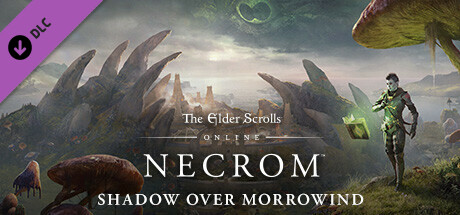
The Elder Scrolls Online (TESO) continues to be a flagship MMORPG, developed and supported by Bethesda with regular patches and substantial yearly expansions. The latest add-on, The Elder Scrolls Online - Necrom, invites players to explore the Telvanni Peninsula of Morrowind, introducing fresh storylines and gameplay opportunities. This expansion enriches the game world with new areas to discover, alongside an immersive narrative deeply connected to the Elder Scrolls lore.
Necrom enhances the TESO experience with the introduction of the Arcanist, a new class capable of wielding powerful magic to defeat enemies in creative ways. The update also brings a wealth of quests and challenges, spanning new territories and dungeons. Players can approach the content solo or engage in cooperative multiplayer to overcome formidable foes and claim rewards. PvP modes are also expanded, allowing combat within arenas or battlefields.
Explore a brand-new region, the Telvanni Peninsula in Morrowind, expanding the game world significantly.
Play as the new Arcanist class, mastering potent magical abilities.
Engage in diverse quests, dungeons, and PvP battles, either solo or with others.
Access new weapons, armor, and customization options to develop your character further.
The Elder Scrolls Online - Necrom keeps building on the long-standing MMORPG foundation, delivering both new and returning players a fresh, content-rich experience. Buy The Elder Scrolls Online - Necrom Key now and compare prices to find the best deal for your Steam access and join the evolving world of Tamriel.
COMMENTS
No comments yet.
Be the first to comment on The Elder Scrolls Online - Necrom!
WRITE A COMMENT
Log in to post a comment.