A Tekken 8 Key is a digital code redeemed on the platform specified in the offer, such as Steam, Steam Gift. Once the code is accepted, the corresponding product is added to your account. Before buying, check the activation platform, edition, region and product type. Keys, accounts and digital gifts have different access and redemption terms.
Where is Tekken 8 the cheapest for PC?
Our price comparison currently lists 47 offers from 24 shops for Tekken 8 Key. The lowest displayed price is 15.77 € at Eneba. The difference from the highest-priced offer in this selection is 89 %. Compare prices together with the platform, product type and activation terms. Also check whether a discount code is available for Eneba; any additional discount depends on its terms. Confirm the final price, possible fees and availability on the shop website. For help with activation or use, visit our frequently asked questions and help guides. Buy Tekken 8 Key and compare prices across the available offers before choosing.
SteamStandardIn Steam, choose “Add a Game”, then “Activate a Product on Steam” and enter your key. Before buying, check the offer’s activation region and terms.
SteamAdvancedIn Steam, choose “Add a Game”, then “Activate a Product on Steam” and enter your key. Before buying, check the offer’s activation region and terms.
SteamStandardIn Steam, choose “Add a Game”, then “Activate a Product on Steam” and enter your key. Before buying, check the offer’s activation region and terms.
Steam GiftStandardA Steam gift is a game received as a gift, for example through a link. Follow the seller’s instructions to accept it in Steam. Before buying, check regional restrictions and delivery terms.
SteamStandardIn Steam, choose “Add a Game”, then “Activate a Product on Steam” and enter your key. Before buying, check the offer’s activation region and terms.
SteamSeason 2 UltimateIn Steam, choose “Add a Game”, then “Activate a Product on Steam” and enter your key. Before buying, check the offer’s activation region and terms.
SteamSeason 2 DeluxeIn Steam, choose “Add a Game”, then “Activate a Product on Steam” and enter your key. Before buying, check the offer’s activation region and terms.
SteamUltimateIn Steam, choose “Add a Game”, then “Activate a Product on Steam” and enter your key. Before buying, check the offer’s activation region and terms.
SteamSeason 2 DeluxeIn Steam, choose “Add a Game”, then “Activate a Product on Steam” and enter your key. Before buying, check the offer’s activation region and terms.
SteamDeluxeIn Steam, choose “Add a Game”, then “Activate a Product on Steam” and enter your key. Before buying, check the offer’s activation region and terms.
SteamStandardIn Steam, choose “Add a Game”, then “Activate a Product on Steam” and enter your key. Before buying, check the offer’s activation region and terms.
SteamSeason 2 DeluxeIn Steam, choose “Add a Game”, then “Activate a Product on Steam” and enter your key. Before buying, check the offer’s activation region and terms.
SteamDeluxeIn Steam, choose “Add a Game”, then “Activate a Product on Steam” and enter your key. Before buying, check the offer’s activation region and terms.
SteamSeason 2 DeluxeIn Steam, choose “Add a Game”, then “Activate a Product on Steam” and enter your key. Before buying, check the offer’s activation region and terms.
Steam GiftDeluxeA Steam gift is a game received as a gift, for example through a link. Follow the seller’s instructions to accept it in Steam. Before buying, check regional restrictions and delivery terms.
SteamSeason 2 DeluxeIn Steam, choose “Add a Game”, then “Activate a Product on Steam” and enter your key. Before buying, check the offer’s activation region and terms.
SteamDeluxeIn Steam, choose “Add a Game”, then “Activate a Product on Steam” and enter your key. Before buying, check the offer’s activation region and terms.
SteamUltimateIn Steam, choose “Add a Game”, then “Activate a Product on Steam” and enter your key. Before buying, check the offer’s activation region and terms.
Steam GiftStandardA Steam gift is a game received as a gift, for example through a link. Follow the seller’s instructions to accept it in Steam. Before buying, check regional restrictions and delivery terms.
Steam GiftUltimateA Steam gift is a game received as a gift, for example through a link. Follow the seller’s instructions to accept it in Steam. Before buying, check regional restrictions and delivery terms.
SteamUltimateIn Steam, choose “Add a Game”, then “Activate a Product on Steam” and enter your key. Before buying, check the offer’s activation region and terms.
SteamStandardIn Steam, choose “Add a Game”, then “Activate a Product on Steam” and enter your key. Before buying, check the offer’s activation region and terms.
SteamUltimateIn Steam, choose “Add a Game”, then “Activate a Product on Steam” and enter your key. Before buying, check the offer’s activation region and terms.
SteamDeluxeIn Steam, choose “Add a Game”, then “Activate a Product on Steam” and enter your key. Before buying, check the offer’s activation region and terms.
SteamUltimateIn Steam, choose “Add a Game”, then “Activate a Product on Steam” and enter your key. Before buying, check the offer’s activation region and terms.
SteamStandardIn Steam, choose “Add a Game”, then “Activate a Product on Steam” and enter your key. Before buying, check the offer’s activation region and terms.
SteamUltimateIn Steam, choose “Add a Game”, then “Activate a Product on Steam” and enter your key. Before buying, check the offer’s activation region and terms.
SteamDeluxeIn Steam, choose “Add a Game”, then “Activate a Product on Steam” and enter your key. Before buying, check the offer’s activation region and terms.
SteamStandardIn Steam, choose “Add a Game”, then “Activate a Product on Steam” and enter your key. Before buying, check the offer’s activation region and terms.
SteamDeluxeIn Steam, choose “Add a Game”, then “Activate a Product on Steam” and enter your key. Before buying, check the offer’s activation region and terms.
SteamUltimateIn Steam, choose “Add a Game”, then “Activate a Product on Steam” and enter your key. Before buying, check the offer’s activation region and terms.
Last price update: 09.11.2026 05:02. Prices from Tekken 8: €15.77 to €145.02. Prices are updated regularly. Check the total price, VAT, platform and product type on the shop website. Additional fees or taxes may apply. You can report incorrect prices or links to us. Information may change or contain errors; accuracy, completeness and freshness are not guaranteed. Some links are affiliate links: Planetkey may receive a commission when you purchase. As an Amazon Associate, we earn from qualifying purchases. Offers initially appear from lowest to highest price; you can change the order.
Price history for Tekken 8
Track the price history of Tekken 8 and compare recorded prices. The comparison currently includes 47 offers from 24 shops. Set a price alert to receive a notification when your target price is reached.
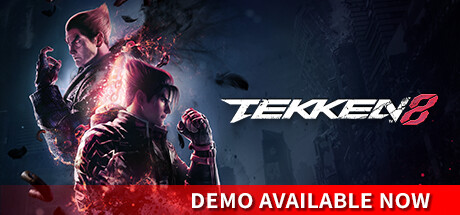
Tekken 8 marks the thrilling return of one of the most acclaimed fighting game franchises, delivering intense battles with spectacular action on PC. Set a few months after the events of its predecessor, the story continues the dramatic conflict within the Mishima clan, focusing on the bitter rivalry between Kazuya Mishima and Jin Kazama. This deep narrative is told through cinematic cutscenes, immersing you in the brutal fights that will ultimately be decided by your skill.
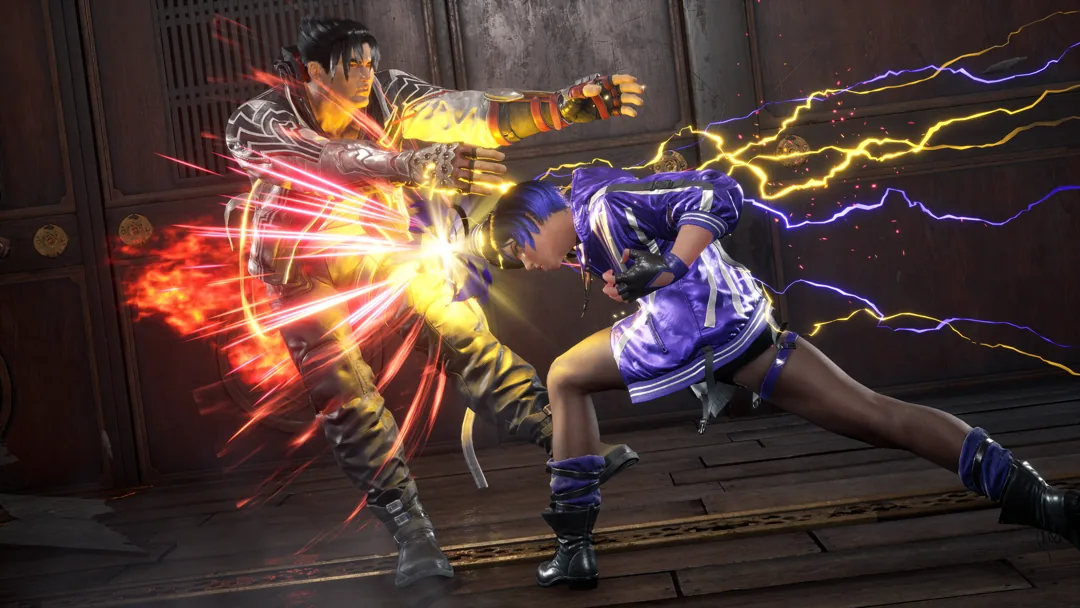
The gameplay system has been significantly revamped, emphasizing more aggressive and destructive combat than ever before. Levels now feature destructible elements adding impact to fights, while the powerful Rage Arts bring a spectacular visual and gameplay highlight. Once unleashed, characters leave a trail of devastation that's hard to escape. With 32 playable fighters at launch—the most in any Tekken installment—you'll find a mix of beloved veterans, new warriors, and special surprises sure to excite long-time fans. Powered by Unreal Engine 5, Tekken 8 pushes technical boundaries to deliver an impressive fighting experience.
Robust story mode continuing the Mishima saga with cinematic presentation
Revamped fighting mechanics featuring destructible stages and enhanced Rage Arts
Largest roster yet with 32 playable characters including new faces and series favorites
Built on Unreal Engine 5 for cutting-edge graphics and performance
Experience the relentless thrill of Tekken 8 by securing your Tekken 8 Key today. Whether you choose the Standard, Deluxe, or Ultimate Edition, find the best prices and gear up for epic battles ahead.
NOTE: *"FPS (frame rate/second): Stable over 60" is guaranteed and selected under the graphic settings by default when the game is launched for the first time. *Frame rate may drop when other applications are running in the background. *Please note that Minimum requirements and Recommended requirements specifications are subjected to changes without notice.
Tekken 8 arrives after several years of anticipation, promising an enriched story experience and a roster packed with new and returning characters. Leveraging Unreal Engine 5, it aims to deliver a visually stunning and mechanically deep fighting game. Fans and newcomers alike can look forward to a dynamic evolution of the series’ signature combat style. Are you ready to step into the arena?
COMMENTS
No comments yet. Be the first to comment on Tekken 8!
Hannes Suhr
Contentmanager
chez Planetkey depuis 2015
L’avis de Planetkey
Tekken 8 arrives after several years of anticipation, promising an enriched story experience and a roster packed with new and returning characters. Leveraging Unreal Engine 5, it aims to deliver a visually stunning and mechanically deep fighting game. Fans and newcomers alike can look forward to a dynamic evolution of the series’ signature combat style. Are you ready to step into the arena?