A The Hand of Merlin Key is a digital code redeemed on the platform specified in the offer, such as Steam, Epic Store. Once the code is accepted, the corresponding product is added to your account. Before buying, check the activation platform, edition, region and product type. Keys, accounts and digital gifts have different access and redemption terms.
Where is The Hand of Merlin the cheapest for PC?
Our price comparison currently lists 19 offers from 17 shops for The Hand of Merlin Key. The lowest displayed price is 4.41 € at Eneba. The difference from the highest-priced offer in this selection is 83 %. Compare prices together with the platform, product type and activation terms. Also check whether a discount code is available for Eneba; any additional discount depends on its terms. Confirm the final price, possible fees and availability on the shop website. For help with activation or use, visit our frequently asked questions and help guides. Buy The Hand of Merlin Key and compare prices across the available offers before choosing.
SteamStandardView all: Steam Keys in unserem Preisvergleich sind EU- oder Regionfree-Keys und können auf deutschen Steam-Accounts aktiviert werden. Öffnet dazu Steam, klickt unten links auf „Spiel hinzufügen“ und wählt „Ein Produkt bei Steam aktivieren“. Gebt euren Key ein und schon steht das Spiel zum Download bereit.
SteamStandardView all: Steam Keys in unserem Preisvergleich sind EU- oder Regionfree-Keys und können auf deutschen Steam-Accounts aktiviert werden. Öffnet dazu Steam, klickt unten links auf „Spiel hinzufügen“ und wählt „Ein Produkt bei Steam aktivieren“. Gebt euren Key ein und schon steht das Spiel zum Download bereit.
SteamStandardView all: Steam Keys in unserem Preisvergleich sind EU- oder Regionfree-Keys und können auf deutschen Steam-Accounts aktiviert werden. Öffnet dazu Steam, klickt unten links auf „Spiel hinzufügen“ und wählt „Ein Produkt bei Steam aktivieren“. Gebt euren Key ein und schon steht das Spiel zum Download bereit.
SteamStandardView all: Steam Keys in unserem Preisvergleich sind EU- oder Regionfree-Keys und können auf deutschen Steam-Accounts aktiviert werden. Öffnet dazu Steam, klickt unten links auf „Spiel hinzufügen“ und wählt „Ein Produkt bei Steam aktivieren“. Gebt euren Key ein und schon steht das Spiel zum Download bereit.
SteamStandardView all: Steam Keys in unserem Preisvergleich sind EU- oder Regionfree-Keys und können auf deutschen Steam-Accounts aktiviert werden. Öffnet dazu Steam, klickt unten links auf „Spiel hinzufügen“ und wählt „Ein Produkt bei Steam aktivieren“. Gebt euren Key ein und schon steht das Spiel zum Download bereit.
SteamStandardView all: Steam Keys in unserem Preisvergleich sind EU- oder Regionfree-Keys und können auf deutschen Steam-Accounts aktiviert werden. Öffnet dazu Steam, klickt unten links auf „Spiel hinzufügen“ und wählt „Ein Produkt bei Steam aktivieren“. Gebt euren Key ein und schon steht das Spiel zum Download bereit.
SteamStandardView all: Steam Keys in unserem Preisvergleich sind EU- oder Regionfree-Keys und können auf deutschen Steam-Accounts aktiviert werden. Öffnet dazu Steam, klickt unten links auf „Spiel hinzufügen“ und wählt „Ein Produkt bei Steam aktivieren“. Gebt euren Key ein und schon steht das Spiel zum Download bereit.
SteamStandardView all: Steam Keys in unserem Preisvergleich sind EU- oder Regionfree-Keys und können auf deutschen Steam-Accounts aktiviert werden. Öffnet dazu Steam, klickt unten links auf „Spiel hinzufügen“ und wählt „Ein Produkt bei Steam aktivieren“. Gebt euren Key ein und schon steht das Spiel zum Download bereit.
SteamStandardView all: Steam Keys in unserem Preisvergleich sind EU- oder Regionfree-Keys und können auf deutschen Steam-Accounts aktiviert werden. Öffnet dazu Steam, klickt unten links auf „Spiel hinzufügen“ und wählt „Ein Produkt bei Steam aktivieren“. Gebt euren Key ein und schon steht das Spiel zum Download bereit.
SteamStandardView all: Steam Keys in unserem Preisvergleich sind EU- oder Regionfree-Keys und können auf deutschen Steam-Accounts aktiviert werden. Öffnet dazu Steam, klickt unten links auf „Spiel hinzufügen“ und wählt „Ein Produkt bei Steam aktivieren“. Gebt euren Key ein und schon steht das Spiel zum Download bereit.
SteamStandardView all: Steam Keys in unserem Preisvergleich sind EU- oder Regionfree-Keys und können auf deutschen Steam-Accounts aktiviert werden. Öffnet dazu Steam, klickt unten links auf „Spiel hinzufügen“ und wählt „Ein Produkt bei Steam aktivieren“. Gebt euren Key ein und schon steht das Spiel zum Download bereit.
SteamStandardView all: Steam Keys in unserem Preisvergleich sind EU- oder Regionfree-Keys und können auf deutschen Steam-Accounts aktiviert werden. Öffnet dazu Steam, klickt unten links auf „Spiel hinzufügen“ und wählt „Ein Produkt bei Steam aktivieren“. Gebt euren Key ein und schon steht das Spiel zum Download bereit.
SteamStandardView all: Steam Keys in unserem Preisvergleich sind EU- oder Regionfree-Keys und können auf deutschen Steam-Accounts aktiviert werden. Öffnet dazu Steam, klickt unten links auf „Spiel hinzufügen“ und wählt „Ein Produkt bei Steam aktivieren“. Gebt euren Key ein und schon steht das Spiel zum Download bereit.
SteamDeluxeView all: Steam Keys in unserem Preisvergleich sind EU- oder Regionfree-Keys und können auf deutschen Steam-Accounts aktiviert werden. Öffnet dazu Steam, klickt unten links auf „Spiel hinzufügen“ und wählt „Ein Produkt bei Steam aktivieren“. Gebt euren Key ein und schon steht das Spiel zum Download bereit.
SteamStandardView all: Steam Keys in unserem Preisvergleich sind EU- oder Regionfree-Keys und können auf deutschen Steam-Accounts aktiviert werden. Öffnet dazu Steam, klickt unten links auf „Spiel hinzufügen“ und wählt „Ein Produkt bei Steam aktivieren“. Gebt euren Key ein und schon steht das Spiel zum Download bereit.
SteamStandardView all: Steam Keys in unserem Preisvergleich sind EU- oder Regionfree-Keys und können auf deutschen Steam-Accounts aktiviert werden. Öffnet dazu Steam, klickt unten links auf „Spiel hinzufügen“ und wählt „Ein Produkt bei Steam aktivieren“. Gebt euren Key ein und schon steht das Spiel zum Download bereit.
Epic StoreStandardIhr erhaltet einen Epic Games Key, den ihr direkt im Epic Games Launcher einlösen könnt. Meldet euch an, klickt auf euer Profil und wählt „Code einlösen“. Gebt euren Key ein und schon steht das Spiel in eurer Bibliothek zum Download bereit.
SteamStandardView all: Steam Keys in unserem Preisvergleich sind EU- oder Regionfree-Keys und können auf deutschen Steam-Accounts aktiviert werden. Öffnet dazu Steam, klickt unten links auf „Spiel hinzufügen“ und wählt „Ein Produkt bei Steam aktivieren“. Gebt euren Key ein und schon steht das Spiel zum Download bereit.
SteamDeluxeView all: Steam Keys in unserem Preisvergleich sind EU- oder Regionfree-Keys und können auf deutschen Steam-Accounts aktiviert werden. Öffnet dazu Steam, klickt unten links auf „Spiel hinzufügen“ und wählt „Ein Produkt bei Steam aktivieren“. Gebt euren Key ein und schon steht das Spiel zum Download bereit.
SteamStandardView all: Steam Keys in unserem Preisvergleich sind EU- oder Regionfree-Keys und können auf deutschen Steam-Accounts aktiviert werden. Öffnet dazu Steam, klickt unten links auf „Spiel hinzufügen“ und wählt „Ein Produkt bei Steam aktivieren“. Gebt euren Key ein und schon steht das Spiel zum Download bereit.
SteamStandardView all: Steam Keys in unserem Preisvergleich sind EU- oder Regionfree-Keys und können auf deutschen Steam-Accounts aktiviert werden. Öffnet dazu Steam, klickt unten links auf „Spiel hinzufügen“ und wählt „Ein Produkt bei Steam aktivieren“. Gebt euren Key ein und schon steht das Spiel zum Download bereit.
SteamDeluxeView all: Steam Keys in unserem Preisvergleich sind EU- oder Regionfree-Keys und können auf deutschen Steam-Accounts aktiviert werden. Öffnet dazu Steam, klickt unten links auf „Spiel hinzufügen“ und wählt „Ein Produkt bei Steam aktivieren“. Gebt euren Key ein und schon steht das Spiel zum Download bereit.
SteamStandardView all: Steam Keys in unserem Preisvergleich sind EU- oder Regionfree-Keys und können auf deutschen Steam-Accounts aktiviert werden. Öffnet dazu Steam, klickt unten links auf „Spiel hinzufügen“ und wählt „Ein Produkt bei Steam aktivieren“. Gebt euren Key ein und schon steht das Spiel zum Download bereit.
SteamDeluxeView all: Steam Keys in unserem Preisvergleich sind EU- oder Regionfree-Keys und können auf deutschen Steam-Accounts aktiviert werden. Öffnet dazu Steam, klickt unten links auf „Spiel hinzufügen“ und wählt „Ein Produkt bei Steam aktivieren“. Gebt euren Key ein und schon steht das Spiel zum Download bereit.
Last price update: 31.10.2026 11:26. Prices from The Hand of Merlin: €4.41 to €26.99. Prices are updated regularly. Check the total price, VAT, platform and product type on the shop website. Additional fees or taxes may apply. You can report incorrect prices or links to us. Information may change or contain errors; accuracy, completeness and freshness are not guaranteed. Some links are affiliate links: Planetkey may receive a commission when you purchase. As an Amazon Associate, we earn from qualifying purchases. Offers initially appear from lowest to highest price; you can change the order.
Price history for The Hand of Merlin
Track the price history of The Hand of Merlin and compare recorded prices. The comparison currently includes 19 offers from 17 shops. Set a price alert to receive a notification when your target price is reached.
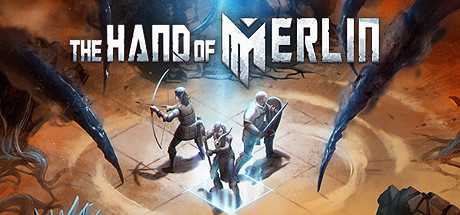
The Hand of Merlin transports players to a captivating world filled with mystical secrets and strategic challenges. As part of the renowned series centered around the legendary magician Merlin, the game blends role-playing elements with tactical adventure, where every decision profoundly affects the course of the story. The richly detailed game world stands out for its atmospheric design and engaging narrative, appealing equally to fans of fantasy tales and strategic gameplay.
Players who purchase a The Hand of Merlin Key gain access to an extensive campaign in which they take on the role of a hero defending the kingdom against dark forces. The gameplay features a variety of spells and abilities that can be developed and customized throughout the game. The combination of turn-based battles and a skillfully told story provides long-lasting enjoyment and many hours of immersive gameplay.
Detailed fantasy world with a captivating storyline centered on Merlin and his magical adventures.
Blend of turn-based combat and strategic decisions for challenging gameplay.
Diverse spells and abilities that can be individually upgraded and tailored.
Rich story mode with multiple endings depending on player choices.
Buying The Hand of Merlin Key offers access to a versatile game that balances challenging combat with an enthralling storyline. It is an excellent choice for fans of fantasy and strategy seeking depth and entertainment.
Requires a 64-bit processor and operating system OS *: Windows 7 SP1 with Platform Update (64 bit) Processor: 3.0 GHz Dual Core Memory: 4 GB RAM Graphics: Nvidia GeForce GT 1030 2GB, AMD Radeon RX 550 2 GB DirectX: Version 11 Storage: 5 GB available space Sound Card: DirectX compatible Additional Notes: Requirements are based on 1080p rendering resolution at 60 FPS using Balanced presets. We also have a 3rd party account system that is optional as well as a EULA that accompanies that.
Requires a 64-bit processor and operating system Operating System: Windows 10 Creators Update (64 bit) Processor: 3.0 GHz Quad Core Memory: 8 GB RAM Graphics: Nvidia GeForce GTX 1080, AMD Radeon RX Vega 64 DirectX: Version 12 Storage: 5 GB available space Sound Card: DirectX compatible Additional Notes: Requirements are based on 2160p rendering resolution at 60 FPS using High Quality presets.We also have a 3rd party account system that is optional as well as a EULA that accompanies that.
COMMENTS
No comments yet. Be the first to comment on The Hand of Merlin!

 Instant Gaming
 Eneba
Eneba Gameboost
 HRK
HRK Kinguin
 Wyrel
Wyrel YUPLAY
 GamersOutlet
 K4G
K4G Loaded (CDKeys)
 G2A
G2A Gamivo
 Gamersgate
 Gamesplanet
 EpicGamesStore
 GreenManGaming
 Gamebillet
 DLGAMER
 Indiegala








COMMENTS
No comments yet.
Be the first to comment on The Hand of Merlin!
WRITE A COMMENT
Log in to post a comment.