A Beast of Reincarnation Key is a digital code redeemed on the platform specified in the offer, such as Steam, Steam Gift, Xbox, Microsoft Store. Once the code is accepted, the corresponding product is added to your account. Before buying, check the activation platform, edition, region and product type. Keys, accounts and digital gifts have different access and redemption terms.
Where is Beast of Reincarnation the cheapest for PC?
Our price comparison currently lists 38 offers from 22 shops for Beast of Reincarnation Key. The lowest displayed price is 11.97 € at Eneba. The difference from the highest-priced offer in this selection is 85 %. Compare prices together with the platform, product type and activation terms. Also check whether a discount code is available for Eneba; any additional discount depends on its terms. Confirm the final price, possible fees and availability on the shop website. For help with activation or use, visit our frequently asked questions and help guides. Buy Beast of Reincarnation Key and compare prices across the available offers before choosing.
SteamStandardIn Steam, choose “Add a Game”, then “Activate a Product on Steam” and enter your key. Before buying, check the offer’s activation region and terms.
SteamStandardIn Steam, choose “Add a Game”, then “Activate a Product on Steam” and enter your key. Before buying, check the offer’s activation region and terms.
SteamStandardIn Steam, choose “Add a Game”, then “Activate a Product on Steam” and enter your key. Before buying, check the offer’s activation region and terms.
SteamStandardIn Steam, choose “Add a Game”, then “Activate a Product on Steam” and enter your key. Before buying, check the offer’s activation region and terms.
SteamStandardIn Steam, choose “Add a Game”, then “Activate a Product on Steam” and enter your key. Before buying, check the offer’s activation region and terms.
SteamStandardIn Steam, choose “Add a Game”, then “Activate a Product on Steam” and enter your key. Before buying, check the offer’s activation region and terms.
SteamStandardIn Steam, choose “Add a Game”, then “Activate a Product on Steam” and enter your key. Before buying, check the offer’s activation region and terms.
SteamStandardIn Steam, choose “Add a Game”, then “Activate a Product on Steam” and enter your key. Before buying, check the offer’s activation region and terms.
SteamStandardIn Steam, choose “Add a Game”, then “Activate a Product on Steam” and enter your key. Before buying, check the offer’s activation region and terms.
SteamStandardIn Steam, choose “Add a Game”, then “Activate a Product on Steam” and enter your key. Before buying, check the offer’s activation region and terms.
SteamStandardIn Steam, choose “Add a Game”, then “Activate a Product on Steam” and enter your key. Before buying, check the offer’s activation region and terms.
SteamStandardIn Steam, choose “Add a Game”, then “Activate a Product on Steam” and enter your key. Before buying, check the offer’s activation region and terms.
Steam GiftStandardA Steam gift is a game received as a gift, for example through a link. Follow the seller’s instructions to accept it in Steam. Before buying, check regional restrictions and delivery terms.
Steam GiftStandardA Steam gift is a game received as a gift, for example through a link. Follow the seller’s instructions to accept it in Steam. Before buying, check regional restrictions and delivery terms.
SteamStandardIn Steam, choose “Add a Game”, then “Activate a Product on Steam” and enter your key. Before buying, check the offer’s activation region and terms.
Steam GiftStandardA Steam gift is a game received as a gift, for example through a link. Follow the seller’s instructions to accept it in Steam. Before buying, check regional restrictions and delivery terms.
SteamDeluxeIn Steam, choose “Add a Game”, then “Activate a Product on Steam” and enter your key. Before buying, check the offer’s activation region and terms.
SteamDeluxeIn Steam, choose “Add a Game”, then “Activate a Product on Steam” and enter your key. Before buying, check the offer’s activation region and terms.
SteamDeluxeIn Steam, choose “Add a Game”, then “Activate a Product on Steam” and enter your key. Before buying, check the offer’s activation region and terms.
Steam GiftDeluxeA Steam gift is a game received as a gift, for example through a link. Follow the seller’s instructions to accept it in Steam. Before buying, check regional restrictions and delivery terms.
Steam GiftStandardA Steam gift is a game received as a gift, for example through a link. Follow the seller’s instructions to accept it in Steam. Before buying, check regional restrictions and delivery terms.
Microsoft StoreStandardYou receive a Microsoft Store key to redeem in your Microsoft account. Enter your code in Microsoft Store; the game will then be available to download from your library.
Steam GiftStandardA Steam gift is a game received as a gift, for example through a link. Follow the seller’s instructions to accept it in Steam. Before buying, check regional restrictions and delivery terms.
SteamStandardIn Steam, choose “Add a Game”, then “Activate a Product on Steam” and enter your key. Before buying, check the offer’s activation region and terms.
SteamDeluxeIn Steam, choose “Add a Game”, then “Activate a Product on Steam” and enter your key. Before buying, check the offer’s activation region and terms.
SteamStandardIn Steam, choose “Add a Game”, then “Activate a Product on Steam” and enter your key. Before buying, check the offer’s activation region and terms.
SteamStandardIn Steam, choose “Add a Game”, then “Activate a Product on Steam” and enter your key. Before buying, check the offer’s activation region and terms.
SteamStandardIn Steam, choose “Add a Game”, then “Activate a Product on Steam” and enter your key. Before buying, check the offer’s activation region and terms.
SteamDeluxeIn Steam, choose “Add a Game”, then “Activate a Product on Steam” and enter your key. Before buying, check the offer’s activation region and terms.
SteamStandardIn Steam, choose “Add a Game”, then “Activate a Product on Steam” and enter your key. Before buying, check the offer’s activation region and terms.
Steam GiftStandardA Steam gift is a game received as a gift, for example through a link. Follow the seller’s instructions to accept it in Steam. Before buying, check regional restrictions and delivery terms.
SteamStandardIn Steam, choose “Add a Game”, then “Activate a Product on Steam” and enter your key. Before buying, check the offer’s activation region and terms.
SteamStandardIn Steam, choose “Add a Game”, then “Activate a Product on Steam” and enter your key. Before buying, check the offer’s activation region and terms.
Steam GiftStandardA Steam gift is a game received as a gift, for example through a link. Follow the seller’s instructions to accept it in Steam. Before buying, check regional restrictions and delivery terms.
SteamDeluxeIn Steam, choose “Add a Game”, then “Activate a Product on Steam” and enter your key. Before buying, check the offer’s activation region and terms.
SteamDeluxeIn Steam, choose “Add a Game”, then “Activate a Product on Steam” and enter your key. Before buying, check the offer’s activation region and terms.
SteamStandardIn Steam, choose “Add a Game”, then “Activate a Product on Steam” and enter your key. Before buying, check the offer’s activation region and terms.
SteamStandardIn Steam, choose “Add a Game”, then “Activate a Product on Steam” and enter your key. Before buying, check the offer’s activation region and terms.
SteamDeluxeIn Steam, choose “Add a Game”, then “Activate a Product on Steam” and enter your key. Before buying, check the offer’s activation region and terms.
Last price update: 26.11.2026 20:00. Prices from Beast of Reincarnation: €11.97 to €84.99. Prices are updated regularly. Check the total price, VAT, platform and product type on the shop website. Additional fees or taxes may apply. You can report incorrect prices or links to us. Information may change or contain errors; accuracy, completeness and freshness are not guaranteed. Some links are affiliate links: Planetkey may receive a commission when you purchase. As an Amazon Associate, we earn from qualifying purchases. Offers initially appear from lowest to highest price; you can change the order.
Price history for Beast of Reincarnation
Track the price history of Beast of Reincarnation and compare recorded prices. The comparison currently includes 38 offers from 22 shops. Set a price alert to receive a notification when your target price is reached.
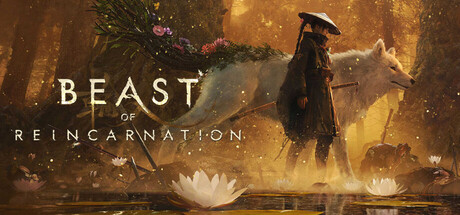
Beast of Reincarnation is an ambitious action RPG developed by Game Freak, the studio best known for the Pokémon series. Departing from their trademark franchise, this new title showcases the studio’s technical and creative versatility. Set in a fantasy version of ancient Japan blended with sci-fi elements, the game features humans, animals, and monsters that disrupt the natural order. Players engage in combat using both traditional and modern weapons, including katanas, alongside supernatural abilities.
The game offers a unique blend of real-time and turn-based combat. Players actively control the protagonist Emma, while commanding her adorable canine companion Kuu to assist in battles against formidable monsters. The storyline is given significant weight alongside the action gameplay, delivering a rich experience praised for its innovative approach within the action RPG genre. Visually, Beast of Reincarnation impresses with its distinctive mix of traditional Japanese aesthetics and futuristic sci-fi influences.
Developed by Game Freak, known for the Pokémon franchise
Action RPG set in a fantasy-sci-fi ancient Japan
Combination of real-time and turn-based combat mechanics
Playable character Emma supported by companion dog Kuu in battles
Experience a refreshing take on the action RPG genre with Beast of Reincarnation. Buy Beast of Reincarnation Steam Key and compare prices to find the best deal for your gaming adventure.
Requires a 64-bit processor and operating system Operating System: Windows 11 Processor: TBD Memory: TBD MB RAM Graphics: TBD Storage: TBD MB available space
Requires a 64-bit processor and operating system Operating System: Windows 11 Processor: TBD Memory: TBD MB RAM Graphics: TBD Storage: TBD MB available space
COMMENTS
No comments yet. Be the first to comment on Beast of Reincarnation!

 Instant Gaming
 Eneba
 Driffle
 keycense
 cjs-cdkeys
 G2A
 LDShop
 Loaded (CDKeys)
 Wyrel
 K4G
 YUPLAY
 Gamivo
 HRK
 difmark

 Gamesplanet
 Gamersgate
 GreenManGaming
 Gamebillet
 Lootbar
 Indiegala
 Kinguin
 Gameboost
 key4games

COMMENTS
No comments yet.
Be the first to comment on Beast of Reincarnation!
WRITE A COMMENT
Log in to post a comment.