A Starfield Key is a digital code redeemed on the platform specified in the offer, such as Steam, Steam Gift, Xbox Play Anywhere, Offizieller Download. Once the code is accepted, the corresponding product is added to your account. Before buying, check the activation platform, edition, region and product type. Keys, accounts and digital gifts have different access and redemption terms.
Where is Starfield the cheapest for PC?
Our price comparison currently lists 41 offers from 20 shops for Starfield Key. The lowest displayed price is 18.73 € at Loaded (CDKeys). The difference from the highest-priced offer in this selection is 82 %. Compare prices together with the platform, product type and activation terms. Also check whether a discount code is available for Loaded (CDKeys); any additional discount depends on its terms. Confirm the final price, possible fees and availability on the shop website. For help with activation or use, visit our frequently asked questions and help guides. Buy Starfield Key and compare prices across the available offers before choosing.
SteamStandardIn Steam, choose “Add a Game”, then “Activate a Product on Steam” and enter your key. Before buying, check the offer’s activation region and terms.
SteamStandardIn Steam, choose “Add a Game”, then “Activate a Product on Steam” and enter your key. Before buying, check the offer’s activation region and terms.
Xbox Play AnywhereStandardAn Xbox Play Anywhere code lets you play the supported game on Xbox One, Xbox Series X|S and a Windows PC at no extra cost. Saved games, add-ons and achievements are automatically synchronised.
Xbox Play AnywhereStandardAn Xbox Play Anywhere code lets you play the supported game on Xbox One, Xbox Series X|S and a Windows PC at no extra cost. Saved games, add-ons and achievements are automatically synchronised.
SteamStandardIn Steam, choose “Add a Game”, then “Activate a Product on Steam” and enter your key. Before buying, check the offer’s activation region and terms.
SteamStandardIn Steam, choose “Add a Game”, then “Activate a Product on Steam” and enter your key. Before buying, check the offer’s activation region and terms.
SteamStandardIn Steam, choose “Add a Game”, then “Activate a Product on Steam” and enter your key. Before buying, check the offer’s activation region and terms.
SteamStandardIn Steam, choose “Add a Game”, then “Activate a Product on Steam” and enter your key. Before buying, check the offer’s activation region and terms.
SteamStandardIn Steam, choose “Add a Game”, then “Activate a Product on Steam” and enter your key. Before buying, check the offer’s activation region and terms.
SteamStandardIn Steam, choose “Add a Game”, then “Activate a Product on Steam” and enter your key. Before buying, check the offer’s activation region and terms.
SteamStandardIn Steam, choose “Add a Game”, then “Activate a Product on Steam” and enter your key. Before buying, check the offer’s activation region and terms.
SteamStandardIn Steam, choose “Add a Game”, then “Activate a Product on Steam” and enter your key. Before buying, check the offer’s activation region and terms.
Xbox Play AnywherePremiumAn Xbox Play Anywhere code lets you play the supported game on Xbox One, Xbox Series X|S and a Windows PC at no extra cost. Saved games, add-ons and achievements are automatically synchronised.
Steam GiftStandardA Steam gift is a game received as a gift, for example through a link. Follow the seller’s instructions to accept it in Steam. Before buying, check regional restrictions and delivery terms.
SteamStandardIn Steam, choose “Add a Game”, then “Activate a Product on Steam” and enter your key. Before buying, check the offer’s activation region and terms.
SteamPremiumIn Steam, choose “Add a Game”, then “Activate a Product on Steam” and enter your key. Before buying, check the offer’s activation region and terms.
Xbox Play AnywherePremiumAn Xbox Play Anywhere code lets you play the supported game on Xbox One, Xbox Series X|S and a Windows PC at no extra cost. Saved games, add-ons and achievements are automatically synchronised.
Xbox Play AnywhereStandardAn Xbox Play Anywhere code lets you play the supported game on Xbox One, Xbox Series X|S and a Windows PC at no extra cost. Saved games, add-ons and achievements are automatically synchronised.
SteamPremium Edition Early AccessIn Steam, choose “Add a Game”, then “Activate a Product on Steam” and enter your key. Before buying, check the offer’s activation region and terms.
SteamPremiumIn Steam, choose “Add a Game”, then “Activate a Product on Steam” and enter your key. Before buying, check the offer’s activation region and terms.
SteamPremiumIn Steam, choose “Add a Game”, then “Activate a Product on Steam” and enter your key. Before buying, check the offer’s activation region and terms.
Steam GiftPremiumA Steam gift is a game received as a gift, for example through a link. Follow the seller’s instructions to accept it in Steam. Before buying, check regional restrictions and delivery terms.
SteamStandardIn Steam, choose “Add a Game”, then “Activate a Product on Steam” and enter your key. Before buying, check the offer’s activation region and terms.
Xbox Play AnywherePremiumAn Xbox Play Anywhere code lets you play the supported game on Xbox One, Xbox Series X|S and a Windows PC at no extra cost. Saved games, add-ons and achievements are automatically synchronised.
Xbox Play AnywherePremiumAn Xbox Play Anywhere code lets you play the supported game on Xbox One, Xbox Series X|S and a Windows PC at no extra cost. Saved games, add-ons and achievements are automatically synchronised.
SteamStandardIn Steam, choose “Add a Game”, then “Activate a Product on Steam” and enter your key. Before buying, check the offer’s activation region and terms.
SteamStandardIn Steam, choose “Add a Game”, then “Activate a Product on Steam” and enter your key. Before buying, check the offer’s activation region and terms.
SteamPremiumIn Steam, choose “Add a Game”, then “Activate a Product on Steam” and enter your key. Before buying, check the offer’s activation region and terms.
Xbox Play AnywherePremiumAn Xbox Play Anywhere code lets you play the supported game on Xbox One, Xbox Series X|S and a Windows PC at no extra cost. Saved games, add-ons and achievements are automatically synchronised.
SteamPremiumIn Steam, choose “Add a Game”, then “Activate a Product on Steam” and enter your key. Before buying, check the offer’s activation region and terms.
SteamPremiumIn Steam, choose “Add a Game”, then “Activate a Product on Steam” and enter your key. Before buying, check the offer’s activation region and terms.
SteamStandardIn Steam, choose “Add a Game”, then “Activate a Product on Steam” and enter your key. Before buying, check the offer’s activation region and terms.
SteamPremiumIn Steam, choose “Add a Game”, then “Activate a Product on Steam” and enter your key. Before buying, check the offer’s activation region and terms.
SteamStandardIn Steam, choose “Add a Game”, then “Activate a Product on Steam” and enter your key. Before buying, check the offer’s activation region and terms.
SteamStandardIn Steam, choose “Add a Game”, then “Activate a Product on Steam” and enter your key. Before buying, check the offer’s activation region and terms.
SteamStandardIn Steam, choose “Add a Game”, then “Activate a Product on Steam” and enter your key. Before buying, check the offer’s activation region and terms.
SteamStandardIn Steam, choose “Add a Game”, then “Activate a Product on Steam” and enter your key. Before buying, check the offer’s activation region and terms.
SteamStandardIn Steam, choose “Add a Game”, then “Activate a Product on Steam” and enter your key. Before buying, check the offer’s activation region and terms.
SteamStandardIn Steam, choose “Add a Game”, then “Activate a Product on Steam” and enter your key. Before buying, check the offer’s activation region and terms.
SteamStandardIn Steam, choose “Add a Game”, then “Activate a Product on Steam” and enter your key. Before buying, check the offer’s activation region and terms.
Xbox Play AnywhereStandardAn Xbox Play Anywhere code lets you play the supported game on Xbox One, Xbox Series X|S and a Windows PC at no extra cost. Saved games, add-ons and achievements are automatically synchronised.
SteamPremiumIn Steam, choose “Add a Game”, then “Activate a Product on Steam” and enter your key. Before buying, check the offer’s activation region and terms.
SteamPremiumIn Steam, choose “Add a Game”, then “Activate a Product on Steam” and enter your key. Before buying, check the offer’s activation region and terms.
SteamPremiumIn Steam, choose “Add a Game”, then “Activate a Product on Steam” and enter your key. Before buying, check the offer’s activation region and terms.
SteamPremiumIn Steam, choose “Add a Game”, then “Activate a Product on Steam” and enter your key. Before buying, check the offer’s activation region and terms.
SteamPremiumIn Steam, choose “Add a Game”, then “Activate a Product on Steam” and enter your key. Before buying, check the offer’s activation region and terms.
SteamPremiumIn Steam, choose “Add a Game”, then “Activate a Product on Steam” and enter your key. Before buying, check the offer’s activation region and terms.
Last price update: 28.11.2026 11:05. Prices from Starfield: €18.73 to €104.49. Prices are updated regularly. Check the total price, VAT, platform and product type on the shop website. Additional fees or taxes may apply. You can report incorrect prices or links to us. Information may change or contain errors; accuracy, completeness and freshness are not guaranteed. Some links are affiliate links: Planetkey may receive a commission when you purchase. As an Amazon Associate, we earn from qualifying purchases. Offers initially appear from lowest to highest price; you can change the order.
Price history for Starfield
Track the price history of Starfield and compare recorded prices. The comparison currently includes 41 offers from 20 shops. Set a price alert to receive a notification when your target price is reached.
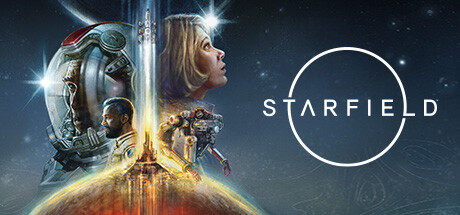
Starfield is Bethesda's ambitious new science-fiction RPG set in the vast expanse of outer space, marking the company's first new intellectual property in over 25 years since The Elder Scrolls. Players will explore a large sandbox galaxy, complete quests, and travel interstellar distances, encountering planets and space stations reminiscent of both desolate surfaces and futuristic hubs. Bethesda aims to establish its own unique narrative and style, distinguishing Starfield from other space franchises like Star Wars or Star Trek.
Developed on Bethesda's proprietary game engine familiar from their previous RPG hits, Starfield emphasizes single-player gameplay after the mixed reception of Fallout 76. The game is expected to support extensive modding by the community, leveraging the well-known capabilities of the engine. While release details are not fully confirmed, the anticipated launch is aimed for the holiday season or early next year. Fans of expansive role-playing adventures and space exploration can look forward to a rich and immersive experience.
Expansive science-fiction RPG in a sandbox space setting
Single-player focus with deep role-playing elements
Developed on Bethesda's acclaimed engine supporting modding
Exploration of multiple planets and large space stations
Starfield offers a fresh take on space role-playing and promises an engaging journey for players seeking freedom and adventure. You can buy Starfield Key for Steam and compare prices to find the best deal for this highly anticipated game.
The most anticipated game of the year finally arrived. Starfield is a masterpiece that will captivate not only Fallout fans but RPG lovers in general. The first hours of gameplay are breathtaking, immersing you immediately in its space setting. Visually, it sets a new atmospheric benchmark, while deeply honoring classic role-playing elements. For us, this is the game of 2023!
COMMENTS
No comments yet. Be the first to comment on Starfield!

 Instant Gaming
 Loaded (CDKeys)
Key shop
 Eneba
 Gamivo
 HRK
 cjs-cdkeys
 K4G
 G2A
 keycense
 Driffle
 Gameseal
 difmark
 YUPLAY
 Electronic First
 Play-Asia
 Gamesplanet
 Gamingdragons
 GreenManGaming
 Kinguin
 key4games
 Gameboost
 Gamebillet
 Gamersgate
 DLGAMER
 Indiegala


Stefan Offermanns
Projektleiter
chez Planetkey depuis 2012
L’avis de Planetkey
The most anticipated game of the year finally arrived. Starfield is a masterpiece that will captivate not only Fallout fans but RPG lovers in general. The first hours of gameplay are breathtaking, immersing you immediately in its space setting. Visually, it sets a new atmospheric benchmark, while deeply honoring classic role-playing elements. For us, this is the game of 2023!